Morse Code with .NET on a Raspberry Pi
Last year I wrote a post showing how to convert a message into Morse code using sound with .NET.
This time, I’m going to use light.
A Raspberry Pi allows you to control real-world devices via its General Purpose Input/Output (GPIO).
In this example, I am going to convert a text message into a set of commands to set a pin on the GPIO high (on) and low (off). This in turn controls an LED to flash the message.
Before you start
You need to install .NET on the Raspberry Pi, or compile this as a self-contained application for ARM chips.
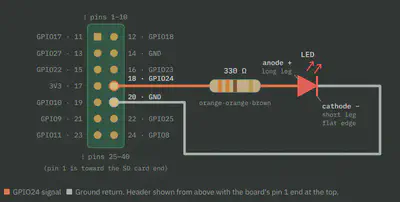
You need to connect an LED to pin 24 and to a ground pin on the GPIO. You should also put a resistor, say 330ohms, between pin 24 and the LED.
The Application
First, add the package System.Device.Gpio to your project.
The code itself is pretty straightforward, there are some inline comments -
 1using System.Device.Gpio;
 2
 3using var piController = new GpioController(); // get a controller
 4var gpio24 = piController.OpenPin(24, PinMode.Output); // get GPIO 24 for writing
 5
 6Dictionary<char, string> MorseCode = new()
 7{
 8    { 'A', ".-" }, { 'B', "-..." }, { 'C', "-.-." }, { 'D', "-.." },
 9    { 'E', "." }, { 'F', "..-." }, { 'G', "--." }, { 'H', "...." },
10    { 'I', ".." }, { 'J', ".---" }, { 'K', "-.-" }, { 'L', ".-.." },
11    { 'M', "--" }, { 'N', "-." }, { 'O', "---" }, { 'P', ".--." },
12    { 'Q', "--.-" }, { 'R', ".-." }, { 'S', "..." }, { 'T', "-" },
13    { 'U', "..-" }, { 'V', "...-" }, { 'W', ".--" }, { 'X', "-..-" },
14    { 'Y', "-.--" }, { 'Z', "--.." }, { '0', "-----"}, { '1', ".----"},
15    { '2', "..---"}, { '3', "...--"}, { '4', "....-"}, { '5', "....."},
16    { '6', "-...."}, { '7', "--..."}, { '8', "---.."}, { '9', "----."},
17    { '.', ".-.-.-"}, { ',', "--..--"}, { '?', "..--.."}, { '\'', ".----."},
18    { '!', "-.-.--"}, { '/', "-..-."}, { '(', "-.--."}, { ')', "-.--.-"},
19    { '&', ".-..."}, { ':', "---..."}, { ';', "-.-.-."}, { '=', "-...-"},
20    { '+', ".-.-."}, { '-', "-....-"}, { '_', "..--.-"}, { '\"', ".-..-."},
21    { '$', "...-..-"}, { '@', ".--.-."}, { ' ', " "}
22};
23
24while (true)
25{
26    Console.WriteLine("\nEnter message to convert to Morse code (CTRL-C to exit):");
27    string? message = Console.ReadLine();
28    if (string.IsNullOrWhiteSpace(message))
29    {
30        Console.WriteLine("No message entered. Exiting.");
31        return 0;
32    }
33
34    foreach (char letter in message.ToUpperInvariant())
35    {
36        if (MorseCode.TryGetValue(letter, out string? code))
37        {
38            foreach (char symbol in code)
39            {
40                if (symbol == '.')
41                    Transmit(DotDash.Dot);
42                else if (symbol == '-')
43                    Transmit(DotDash.Dash);
44                else if (symbol == ' ') // end of word
45                    Thread.Sleep(500);
46            }
47        }
48    }
49}
50
51void Transmit(DotDash dotDash)
52{
53    gpio24.Write(PinValue.High);
54    Thread.Sleep((int)dotDash);
55    gpio24.Write(PinValue.Low);
56    Thread.Sleep(100); //stay off between each symbol
57}
58
59enum DotDash
60{
61    Dot = 200,
62    Dash = 400,
63}
That’s it, you should now have a flashing LED in Morse.